What Are the Benefits of Using WebPinch for Client Feedback?
Client feedback is really important when you are working on a website project. If you are a person who makes websites, a freelancer, a person who writes code or a business owner getting feedback from clients is very important. It helps your project move from the building stage to the launch stage quickly.
WebPinch is a tool that changes the way people collect and use client feedback. Of using long email conversations taking pictures of the screen or sending lots of messages WebPinch lets clients and team members leave notes right on the website. This makes it easier for people to talk to each other reduces confusion and helps get the project done faster.
In this guide we will talk about the things about using WebPinch for client feedback. We will also talk about why WebPinch’s a very useful tool, for people who make websites. WebPinch is a tool that helps with client feedback. It is becoming very important for teams that work on websites.
What Is WebPinch?
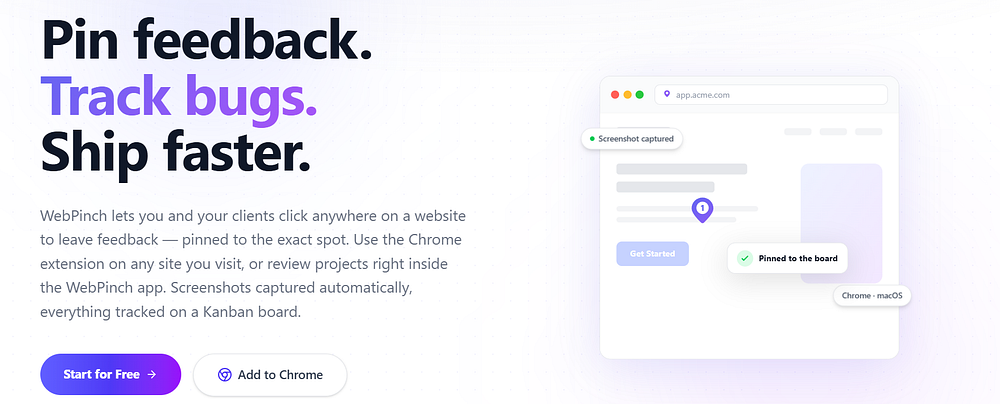
WebPinch is a tool that helps people work together on websites. It lets clients, designers, developers, QA testers and project managers talk directly on a website.Of sending emails or chat messages to explain problems users just click on the website add comments and attach pictures if needed.They can also assign tasks to team members.This way of working keeps all feedback connected to the spot, on the website.Every piece of feedback is linked to where it belongs. WebPinch helps teams work together on websites. It makes it easy to find and fix issues.
Why Is Efficient Client Feedback Important?
Website projects have people involved. When feedback comes in through emails, spreadsheets, messaging apps and phone calls teams waste time sorting information of working on the website.
Good client feedback helps:
* Reduce project delays
* Improve communication
* Minimize misunderstandings
* Speed up approvals
* Deliver websites
* Make clients happier
3. Top Benefits of Using WebPinch for Client Feedback
A single feedback system makes sure everyone uses the same information.
1. See What People Think on Your Website
One of the best things about WebPinch is that people can leave comments that you can see.
Of saying something like: “The button near the bottom does not look right.”
People can just click on the button. Write a comment, about it.
This way everyone knows what they are talking about and developers can fix things away.
Benefits
* Find the problem
* No confusing explanations
* Fix things faster
* People talk to each other better with WebPinch
WebPinch makes it easier for people to tell you what they think about your website and WebPinch helps developers fix things quickly.
2. Faster Client Approvals
Waiting for approvals often delays website launches.
With WebPinch, clients can review pages, leave comments, verify completed changes, and approve updates without switching between multiple tools. This shortens review cycles and helps projects move forward quickly.
3. Eliminate Endless Email Chains
Traditional website feedback usually looks like this:
Email
Reply
Screenshot
Follow-up email
Slack message
Phone call
Information becomes scattered.
WebPinch centralizes every discussion in one location, making it easy for the entire team to stay aligned.
4. Better Collaboration Between Teams
When we work on website projects there are a lot of people involved.
We have Clients and Designers and Developers and QA testers and Project managers.
WebPinch is a place where all these people can work together.
They can see what everyone is saying, give each tasks and see how things are going without losing any important information.
5. Reduce Website Revision Cycles
Sometimes people do not understand each other. This causes problems.
We have to do the thing many times.
When Developers know what they need to do they do not have to guess.
They can just fix the problems.
WebPinch helps reduce the number of times we have to do things over.
This helps us finish projects on time.
6. Improve Bug Reporting
Finding problems is not the hard part.
Telling people about the problems is also important.
WebPinch helps us report problems in a way.
We can say where the problem is on the page.
We can mark the problem so everyone can see it.
We can write a comment about the problem.
We can also give information to help people understand the problem.
Developers can then fix the problems quickly.
7. Save Time for Agencies
Agencies often work on projects at the same time.
Of looking through emails or spreadsheets agencies can use WebPinch to keep all the information, about website projects in one place.
This helps agencies work efficiently.
Project managers can also keep Clients informed about what’s happening with their projects.
8. Make Giving Feedback Easy for Clients Who Are Not Technical
A lot of clients do not know what technical words mean.
They should not have to explain problems with CSS or HTML elements.
WebPinch makes it easy for anyone to click on a problem add a comment and send feedback that they can see.
This makes it easy for every client to review a website, no matter how much they know about technology.
9. Keep All Comments In Order
One problem with website projects is keeping track of what has been done and what still needs to be done.
With WebPinch all feedback is kept in order, which makes it easy to do things like:
* Review problems that’re still open
* Track changes that have been made
* Decide which problems to fix first
* Check how the project is going
This means that important requests from clients are less likely to be missed.
10. Deliver Better Websites Quickly
The main goal of any system, for giving feedback is to make sure the final product is good.
WebPinch helps teams do this by making it easy for them to talk to each other and by reducing confusion.
This means that websites can be launched with delays and they will be of higher quality.
WebPinch helps teams deliver websites faster.
How WebPinch Improves Agency Workflows
WebPinch is really helpful for agencies because it makes the review process very organized.
WebPinch puts all the feedback in one place so teams do not have to look for it in lots of emails or messages.
This makes a difference in several areas, including:
* Project management
* Client satisfaction
* Team productivity
* Delivery speed
* Overall communication
Using WebPinch results in a smoother process for agencies, from when they start designing something to when they finally launch it. WebPinch really helps with this process.
Best Practices for Collecting Client Feedback
To really get the most out of WebPinch you should do a things.First you should ask your clients to leave comments on the webpage.This is very helpful.Then you and your team should look at the feedback often. You should fix the problems first. It is an idea to resolve the comments before you ask for final approval.Try to keep all the talking about the project in one place.Doing these things makes the review process faster and easier to see what is going on.
WebPinch is a tool and using it this way makes it even better.
You will get value from WebPinch if you follow these best practices, for collecting client feedback.
Frequently Asked Questions
What is WebPinch?
WebPinch is a visual website feedback platform that enables users to leave comments directly on web pages, simplifying communication between clients and development teams.
Who should use WebPinch?
Agencies, freelancers, web developers, designers, QA teams, marketers, and businesses managing website projects can all benefit from WebPinch.
Can non-technical clients use WebPinch?
Yes. WebPinch is designed to make website feedback simple for everyone, regardless of technical expertise.
How does WebPinch improve collaboration?
By keeping comments, tasks, and discussions connected to specific areas of a webpage, WebPinch reduces confusion and improves communication across teams.
Does WebPinch help reduce website revisions?
Yes. Clear visual feedback allows developers to understand requirements quickly, reducing unnecessary revisions and project delays.
Why is visual feedback better than email feedback?
Visual feedback provides context by linking comments directly to the relevant part of a webpage, making issues easier to understand and resolve.
Final Thoughts
Collecting feedback from clients should not hold up your website projects. These days teams need something that helps them communicate in an organized way. WebPinch is a way to get feedback from clients. It helps people work together makes it easier to report problems and gets projects approved faster. If you are working on one website or many client projects using WebPinch can help you do things efficiently. You will not have to make many changes and your team will work better together. This means you can deliver quality websites more quickly.
If you want to make reviewing websites easier and make things better, for clients and the people building the websites then WebPinch is an option to consider.
Try WebPinch free
Pin feedback on any website, capture screenshots automatically, and track everything on a Kanban board.